VM orchestration for modern CI/CD teams

Manage, automate and scale Parallels Desktop hosts and virtual machines from a single control plane.

Everything your DevOps team needs

From golden image catalogs to full multi-host orchestration
All exposed through a clean API and now a full UI.

Golden Image Catalog

Host and share VM templates across your team. Version-controlled, immutable, instantly clonable golden images for any OS.

Explore catalog →

Multi-host Orchestration

Control fleets of Parallels Desktop hosts from one dashboard. Start, stop, clone and snapshot VMs at scale with zero manual effort.

Explore orchestration →

CI/CD Runners

Using our GitHub Actions or Jenkins integration, spin up native macOS, Windows or Linux runners on your own hardware. No shared infra, no queues — your builds, your metal.

Explore CI/CD →

Full UI Dashboard

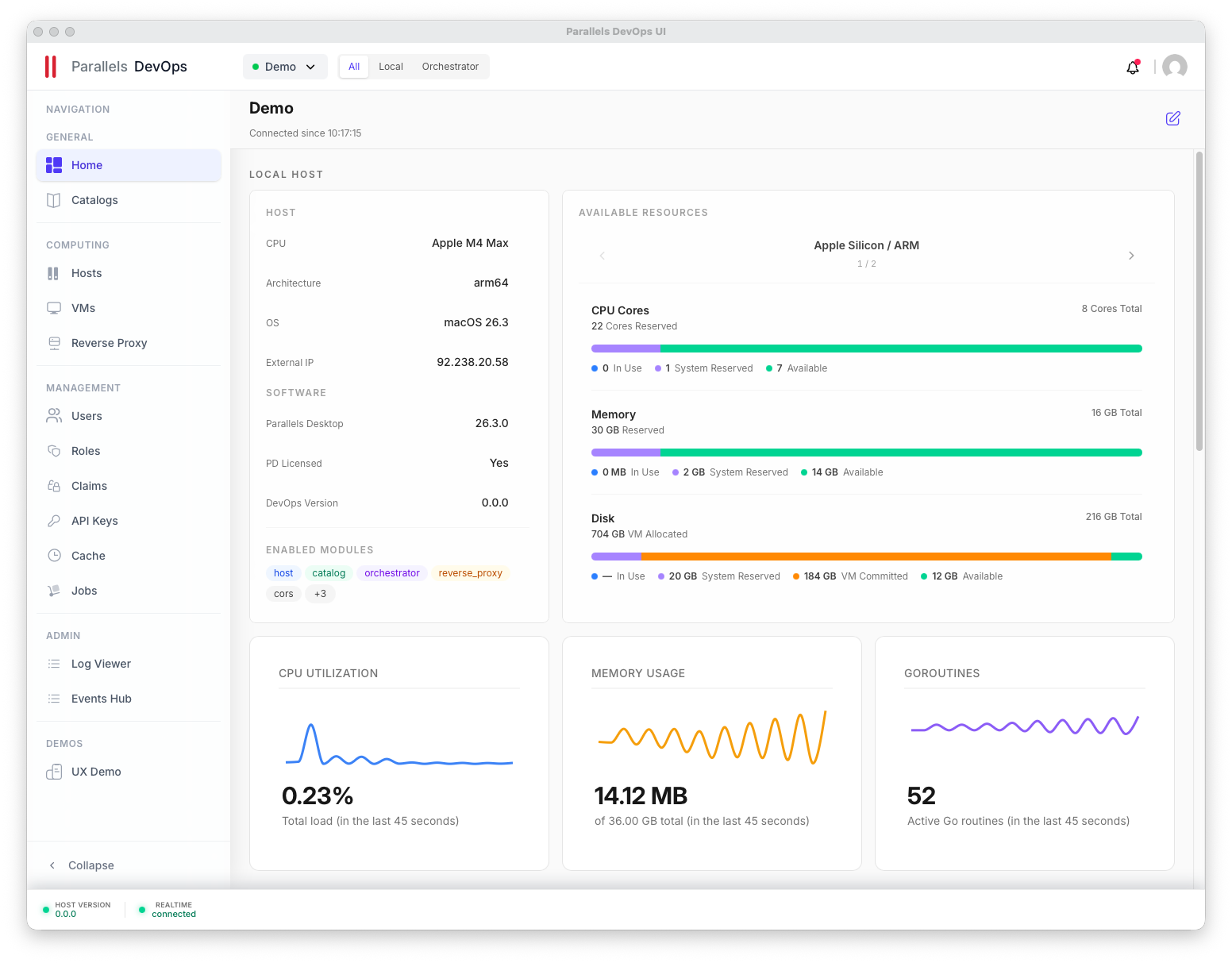
A native control panel for every VM and host — live metrics, one-click actions, and full visibility across your entire fleet.

Try the new UI →

REST API & CLI

Every action available in the UI is also in the API. Automate everything, integrate anywhere, script anything.

API reference →

Fair Source License

Free and open-source, but requires a Parallels Desktop license. Pro covers up to 10 users; more requires a Business or Enterprise license.

View licensing →
HOW IT WORKS

Up and running in minutes

No complex setup. Just install, configure, and orchestrate.

1

Install the service

Deploy the binary on any macOS host running Parallels Desktop Business or Enterprise.

Quick start guide →
2

Connect your hosts

Register multiple hosts to the orchestrator for a unified control plane.

View docs →
3

Build your catalog

Push golden images that your pipelines and teams can clone on demand.

Learn more →
4

Automate

Hook into GitHub Actions, REST API, or use the new desktop UI dashboard.

See integrations →

Download the Tools

Parallels DevOps UI
Available on:
Parallels DevOps Agent (CLI)
Run Install Script
curl -sSL https://raw.githubusercontent.com/Parallels/prl-devops-service/main/scripts/install.sh | bash
or

Join the Community

Connect with other developers and engineers.

Loading...
Latest Releases
Release 1.0.5 July 22, 2026

Whats New

  • fixed HTTP method types in /machines
  • fix: fixed cloning a VM with a name is failing in the orchestrator mode
  • #524 # Type of change
  • Bug fix (non-breaking change which fixes an issue)
  • Added Jenkins minimum required version in user guide
  • Merged parallel jobs into a single sequential job — Previously deploy-orchestrator and deploy-catalog ran as independent parallel jobs. Combined into one deploy-services job with conditional steps to prevent namespace CPU quota conflicts (2 CPU limit). Retained conditional deployment flexibility — Can still deploy orchestrator only, catalog only, or both via deploy_orchestrator/deploy_catalog input flags.
  • Use python3 to extract kubelogin and fix unzip error (runner does not have unzip pre-installed)
  • Fixed --wait/--atomic redundancy — --atomic already implies --wait; refactored to elif to avoid specifying both flags simultaneously
  • Added –hide-notes to Helm deploy commands to reduce log verbosity.
  • Runtime masking added for OIDC subject and audience.
  • Cluster name and resource group added as repository secrets - values not exposed in logs.
  • Lowered CPU limits per pod in both std & prd values files so rolling upgrades can run old and new pods concurrently.
  • Update workflow permissions. Add actions: write to allow createWorkflowDispatch calls.
  • GitHub-hosted runners cannot resolve the private AKS API endpoint. Switch to self-hosted runner with network access to the private cluster.
  • Convert kubeconfig to use azurecli login mode to bypass interactive browser prompts. Fixes errors in CI.
  • Add a 30-minute timeout safeguard to prevent the step from hanging indefinitely.
  • Install kubelogin with GITHUB_TOKEN for AKS authentication
  • Fix deployment workflow, namely Helm deploy steps by installing kubelogin.
  • Summary of change:
  • Updated the workflow job gate to use the boolean dispatch input directly:
  • if: $
  • Fixes # (issue)
  • The SecretProviderClass and workload identity (used to access Key Vault) are created by the infra repo, so that app must be synced before deploying this chart. The runtime Kubernetes Secret is then synced by the CSI driver when the application pod starts.
  • Repository secrets and variables for Azure login and AKS context must be configured.
  • OIDC trust uses the main branch subject because GitHub Environments are not available on the current plan.
  • Chart changes take effect only after merge to main and redeployment.
  • Type of change
  • Bug fix (non-breaking change which fixes an issue)
  • New feature (non-breaking change which adds functionality)
  • This change requires a documentation update
  • What changed
    1. Deployment workflow
  • Added separate deploy jobs for orchestrator and catalog.
  • Added workflow inputs to deploy either component independently.
  • Documented workaround for GitHub Environments limitation: OIDC trusted subject is main branch ref.
    1. Environment-specific Helm values
  • Added dedicated staging and production values overlays.
  • Tuned replica count and resource requests/limits per environment.
  • Added node affinity and tolerations for the intended node pool.
  • Added envFrom runtime secret consumption pattern.
    1. SecretProviderClass integration in app deployment
  • Added optional CSI volume and mount in deployment template.
  • CSI mount is opt-in and remains disabled by default in base values.
  • Enables runtime sync flow: Key Vault to CSI to Kubernetes Secret to pod environment.
    1. Template fixes
  • Fixed incorrect security key gating condition to use the correct encryption private key field in templates.
  • Prevents render issues when inline secret fallback paths are used.
  • Required repository configuration
  • Secrets:
  • STG_AZURE_CLIENT_ID
  • STG_AZURE_TENANT_ID
  • STG_AZURE_SUBSCRIPTION_ID
  • PRD_AZURE_CLIENT_ID
  • PRD_AZURE_TENANT_ID
  • PRD_AZURE_SUBSCRIPTION_ID
  • Variables:
  • STG_AKS_RESOURCE_GROUP
  • STG_AKS_CLUSTER_NAME
  • PRD_AKS_RESOURCE_GROUP
  • PRD_AKS_CLUSTER_NAME
  • Secret prerequisites and expected keys
  • Runtime Kubernetes Secret must exist before app rollout, populated by infra-managed SecretProviderClass sync.
  • Expected keys:
  • JWT_HMACS_SECRET
  • ENCRYPTION_PRIVATE_KEY
  • ROOT_PASSWORD
  • Why this pattern:
  • Security: no secrets committed to values files.
  • Operations: secret rotation in Key Vault without chart changes.
  • Portability: chart consumes envFrom and remains provider-agnostic.
  • Deployment order
  • Sync infra secrets app and verify runtime secret exists in namespace.
  • Deploy orchestrator and catalog via workflow (independently or together).
  • Validate pod readiness and application startup logs.
  • Checklist
  • I have performed a self-review of my own code
  • I have made corresponding changes to the documentation
  • My changes generate no new warnings
  • I have run tests that prove my fix is effective or that my feature works
  • I have updated the CHANGELOG.md file accordingly
Release 1.0.4 July 06, 2026

Whats New

  • Fixed a nill ptr panic when the compression level is not mentioned in the PD file.
  • Invoking a validate call when push is invoked via CLI, the validate call is being invoked in a REST call
  • Jenkins plugin use case with prldevops
  • Fixes #470
  • Please include a summary of the change and which issue is fixed. Please also include relevant motivation and context. List any dependencies that are required for this change.
  • Fixes # (issue)
Release 1.0.3 June 22, 2026

Whats New

  • change the way we install the service, reducing the amount of environment variables and adding more in the config file